
Custom NS with CNAME
If you are unable to use WEDOS DNS as the primary DNS provider, add the domain to WEDOS.protection in CNAME mode.
To protect the main (second-level) domain in CNAME mode, your DNS provider must support CNAME flattening or an equivalent record type such as ANAME or ALIAS, which allows CNAME-like behavior on the main domain.
When a domain is added in CNAME mode, the system performs several validation steps to ensure the configuration is correct.
DNS Record Scan
The DNS record scan checks the domain for common record types and names. The scan results may not show all of the DNS records you have in your zone file, but this will not affect the functionality of WEDOS Protection. The actual records in the authoritative DNS zone file, as well as the Target IPs in WGP, are what allow WGP to function correctly.
Set up CNAME Records
To proceed, create the following CNAME records at your DNS provider using the specific data provided to you in the WGP dashboard:
Name              Type    Data
_acme-challenge   CNAME   _acme-challenge.domain.tld.wedos.global
*                 CNAME   domain.tld.wedos.global
www               CNAME   domain.tld.wedos.global
The _acme-challenge record is required for issuing and renewing the SSL certificate. The www and * records direct the www subdomain and all unspecified subdomains to the set target IPs.
Protect the Root Domain
If supported by your DNS provider, create an additional record for the root (second-level) domain using the same data as the * or www record (domain.tld.wedos.global). Without this, the root domain will still point directly to the domain’s web server and will not be protected by WEDOS.protection.
If your DNS provider does not support CNAME flattening, ANAME, or ALIAS records, you can instead point the main domain to the proxy using A and AAAA records. The required proxy IP addresses are available in the WGP dashboard under Service DNS Addresses by clicking Show IP addresses.
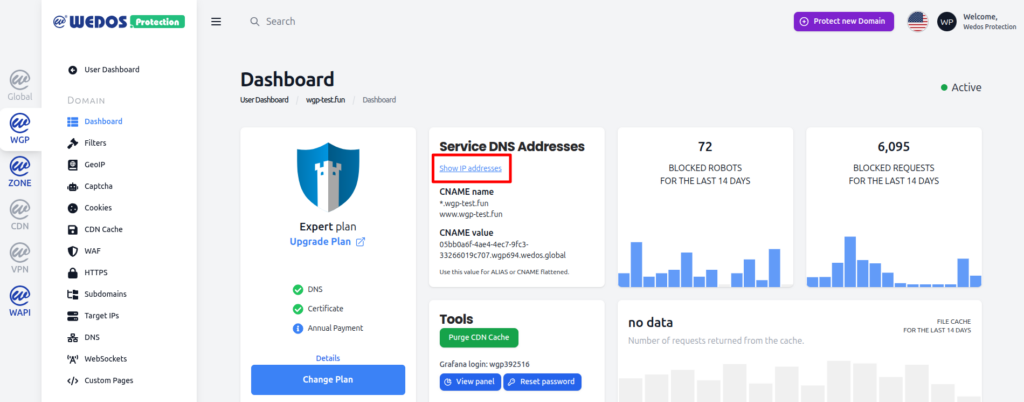
When using proxy IP addresses directly, keep in mind that changes to these addresses must be applied manually. While CNAME target data is updated automatically by WEDOS, A and AAAA records in a 3rd party DNS zone cannot be updated automatically by WEDOS.
Finalize Setup
Before completing the setup, verify that no unnecessary DNS records remain in the zone file.
A common configuration issue is leaving domain web server IP addresses in DNS records while also adding WEDOS.protection proxy records. To ensure full protection, all relevant DNS records must point exclusively to the WEDOS proxy.