
Update Target IPs / CNAME
WEDOS.protection can secure any web server, regardless of where it is hosted. If the web server is moved or its IP addresses change, you do not need to update your DNS records because your domain will still be directed to the WGP proxy servers. Instead, the upstream configuration—referred to as Target IPs / CNAME—must be updated in the WGP dashboard.
Example Scenario
Assume your current setup uses a single IP address:
- IPv4: 46.28.105.2
You upgrade to a new service with the following IP addresses:
- IPv4: 31.31.72.72
- IPv6: 2a02:2b88:2:1::72
In this case, no changes to DNS are required. You only need to update the Target IPs used by WEDOS.protection.
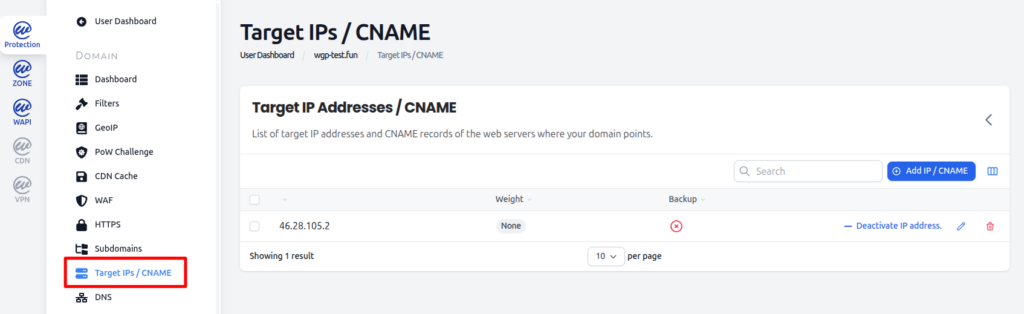
To update Target IPs, go to the WGP dashboard and select the domain. In the Domain detail, navigate to Target IPs / CNAME.
Click Add IP / CNAME to add the new IP addresses. Newly added Targets are initially disabled, allowing you to prepare the configuration while the system continues using the existing IPs. When you are ready to switch, Deactivate the old Target and Activate the new Targets. Unlike DNS changes, updates to Targets take effect immediately.
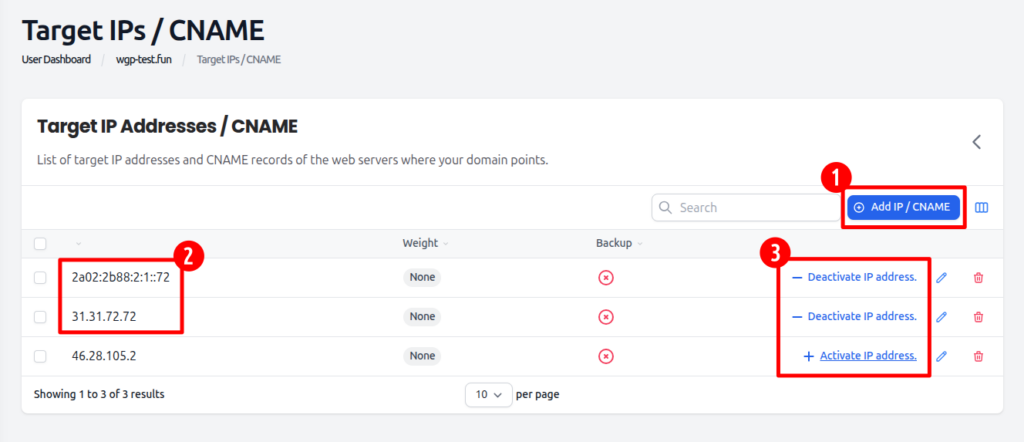
Once the new server setup is confirmed to be fully operational and compatible, the outdated Target can be safely removed from the configuration.