CDN Cache and the Web Application Firewall (WAF) are key components of WEDOS.protection that work together to improve both performance and security. While caching helps deliver content faster and reduce server load, the WAF inspects incoming requests and blocks malicious traffic before it reaches the application.
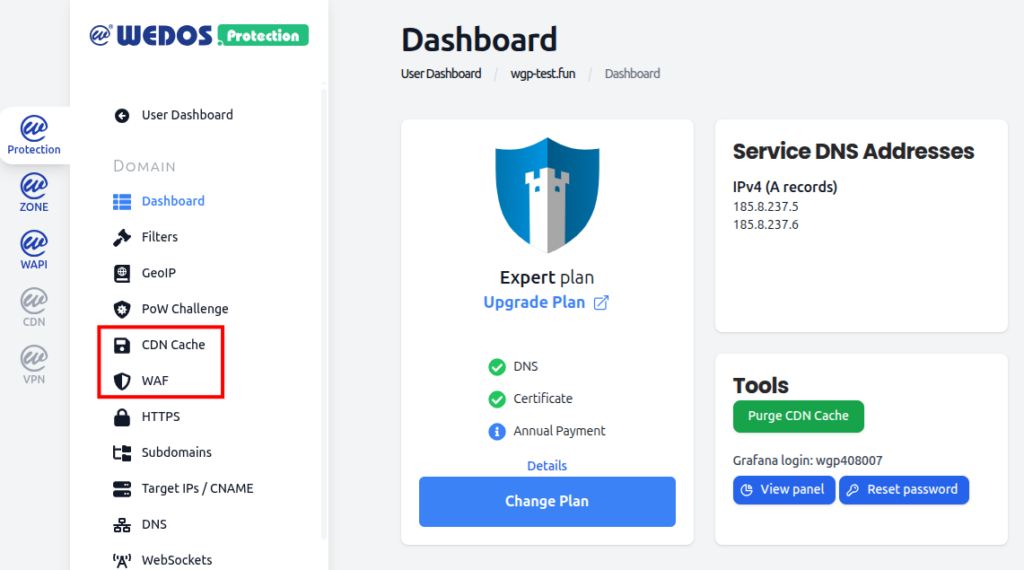
To manage CDN cache and WAF in the WGP dashboard, select a domain and then navigate to either CDN Cache or WAF under the Domain details.
Access CDN Cache and WAF in dashboard
CDN Cache
CDN Cache stores copies of the website content on distributed proxy servers. When a visitor requests cached content, it can be delivered directly from the nearest edge location instead of the origin server.
This provides several benefits:
Faster page load times for visitors.
Reduced load on the origin server.
Improved resilience during traffic spikes or attacks.
Caching is especially effective for static content such as images, stylesheets, scripts, and other files that do not change frequently.
How CDN Cache Works
When a request is received, WEDOS.protection first checks whether the requested content is already cached. If a valid cached version exists, it is served immediately. If not, the request is forwarded to the origin server, and the response may be cached for future requests.
Cache behavior is influenced by:
Cache settings in WEDOS.protection.
HTTP headers sent by the origin server.
Cache rules defined for specific URLs or file types.
This allows caching to be optimized without breaking dynamic or personalized content.
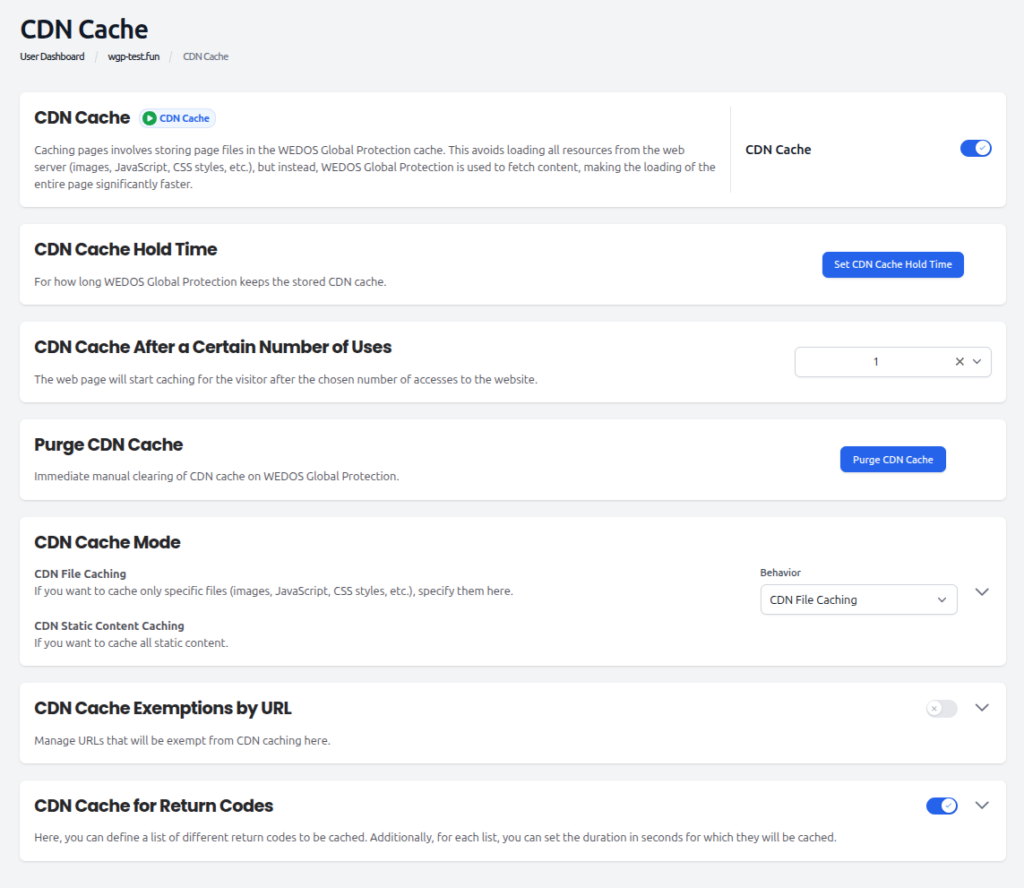
Managing CDN Cache Settings
With the Start subscription and above you can enable/disable and purge CDN Cache. With the Advanced subscription and above you can adjust mode and return code settings. With the Expert subscription and above you can adjust all settings:
CDN Cache Hold Time. Sets how long WGP keeps the CDN cache stored.
CDN Cache After a Certain Number of Uses. Set the number of visits required to start caching.
Purge CDN Cache. Clear the CDN cache on WGP for the website – useful when changes have been made to the static web content.
CDN Cache Mode. Choose CDN File Caching to cache only specific file types which you specify. Choose CDN Static Content Caching* to cache all static content (default).
CDN Cache Exemptions by URL. Manage URLs which are exempt from CDN cache.
CDN Cache for Return Codes. Create a list of return codes to be cached and set the cache duration for each.
CDN Cache custom settings*It is important to note that the CDN Static Content Caching setting may cache dynamically generated pages (for example .php) if the server returns them with one of these HTTP return codes: 200 (OK), 302 (Found), 304 (Not Modified), 307 (Temporary Redirect), and 404 (Not Found).
Web Application Firewall (WAF)
The Web Application Firewall is designed to protect the website against common web attacks such as:
SQL injection.
Cross-site scripting (XSS).
Malicious bots and scanners.
Exploitation of known vulnerabilities.
The WAF analyzes incoming requests at the proxy level and blocks or challenges suspicious behavior before it reaches the web server.
How WAF Works
WEDOS.protection uses a combination of predefined security rules and data-driven analysis to identify malicious traffic patterns. These rules inspect request parameters, headers, URLs, and behavior patterns to detect potential threats.
With the Start and Advanced subscription plans, WAF works in AI Mode only. By upgrading to the Expert plan or higher, you can adjust the WAF Mode which controls the ruleset used by the Web Application Firewall for the selected domain. Three modes are available:
Advanced WAF (full ruleset) — default. Runs the complete WAF ruleset, including core protections and extended signatures for application-layer attacks. Recommended for most websites and applications.
Basic WAF (core rules only). Runs only the core ruleset. Useful when the full ruleset causes false positives on a legitimate but unusual application, and you need a smaller, more conservative set of signatures.
Disabled. Turns off WAF rule evaluation entirely. AI Mode, Filters, GeoIP, and Combo Rules remain active.
WAF Mode
Combo Rules
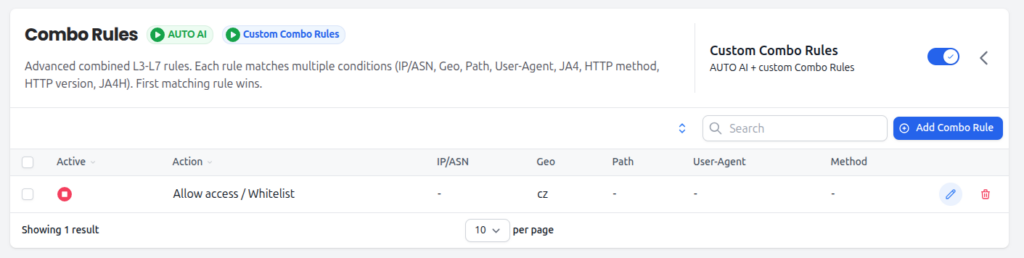
Combo Rules are advanced combined L3–L7 rules. Each rule matches on multiple conditions, and the first matching rule wins. Order rules from most specific to most general — for example, allow rules for known good crawlers first, then a catch-all block at the bottom.
Combo Rules run alongside AUTO AI, which always evaluates traffic in the background. AUTO AI cannot be disabled.
Combo Rules
Matching fields
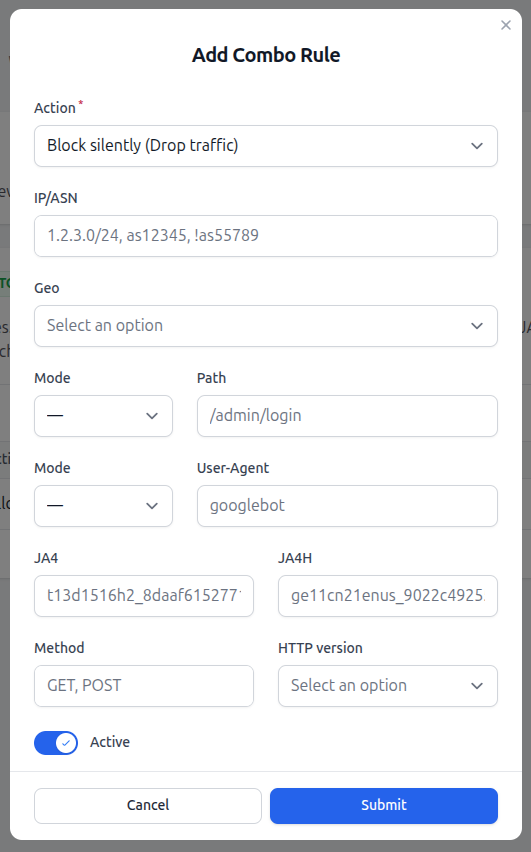
Each Combo Rule can match on up to nine fields. Any field can be left empty to act as a wildcard, and any field can be negated (using a ! prefix where supported, such as !as55789). For a rule to fire, all active fields must match.
IP/ASN: Source IP address, CIDR range, or Autonomous System Number. Multiple values can be entered as a comma-separated list (e.g. 1.2.3.0/24, as12345, !as55789).
Geo: Country or continent code, as used by GeoIP.
Path: URL path on the domain (e.g. /admin/login). Supports exact and prefix matching depending on the selected Mode.
User-Agent: Value of the User-Agent HTTP header (e.g. googlebot). Supports exact and substring matching depending on the selected Mode.
JA4: JA4 TLS fingerprint of the client. Useful for matching a specific client TLS stack independently of its self-declared User-Agent.
JA4H: JA4H HTTP fingerprint of the client. Useful for catching bots that mimic a browser at the TLS layer but expose themselves at the HTTP layer.
Method: One or more HTTP methods, comma-separated (e.g. GET, POST).
HTTP version: HTTP protocol version of the request (e.g. HTTP/1.1, HTTP/2, HTTP/3).
Combo Rule fields
When a Combo Rule matches, one of the following actions is applied:
Allow access / Whitelist: Bypass all protection layers and deliver the request directly to the origin server. Use only for trusted, well-identified traffic (e.g. a verified internal monitoring system).
CAPTCHA verification (Proof of Work): Serve a Proof of Work / bot challenge before allowing the request through.
Block with error page (HTTP 456): Block the request and return a customizable error page with HTTP status 456.
Block silently (drop traffic): Silently discard the request. The client receives no response. Useful against attack traffic where you do not want to confirm the request reached a server.
Performance and Security Working Together
CDN cache and WAF complement each other by handling different aspects of traffic management:
CDN cache reduces load and speeds up delivery of legitimate content.
WAF ensures that only safe and valid requests are allowed through.
Used together, these features help ensure the website remains fast, stable, and protected against common web-based attacks. By stopping malicious traffic early and serving cached content efficiently, WEDOS.protection helps maintain availability even during high traffic or attack scenarios.