
Subdomains
A single WEDOS.protection service can protect not only the main domain (second-level domain, i.e. domain.com), but also multiple subdomains (third-level domains, i.e. shop.domain.com). This allows you to secure your entire web presence under one protection service, as long as the technical and security requirements match.
How subdomains are handled depends primarily on their target IP addresses and whether they require the same protection settings as the main domain.
How Subdomain Protection Works
WEDOS.protection can automatically include subdomains under the same service when certain conditions are met:
- Same Target IP Address. Subdomains that point to the same target IP address as the main domain are protected automatically (as long as the DNS record points to the WGP proxy). No additional configuration is required.
- Same Protection Requirements. If a subdomain should use the same security settings, filters, and behavior as the main domain, it can remain part of the same WEDOS.protection service.
If a subdomain uses a different target IP address than the main domain, you must configure the subdomain in WGP. If the subdomain requires different protection settings than the main domain, the subdomain will require its own individual service.
Configuring Subdomains with a Different Target IP
To protect a subdomain hosted on a different IP address, add it to the Subdomains list in the WGP dashboard.
Log in to your WEDOS.global account and select the main domain in the WGP panel:
- Navigate to the Subdomains section.
- Click Add IP for subdomain.
- Enter the required information:
- Subdomain Name. Only the subdomain part, such as admin or store, without the main domain (for example shop for the subdomain shop.domain.com).
- Target IP Address. The IP address of the server hosting the subdomain.
- Click Submit.
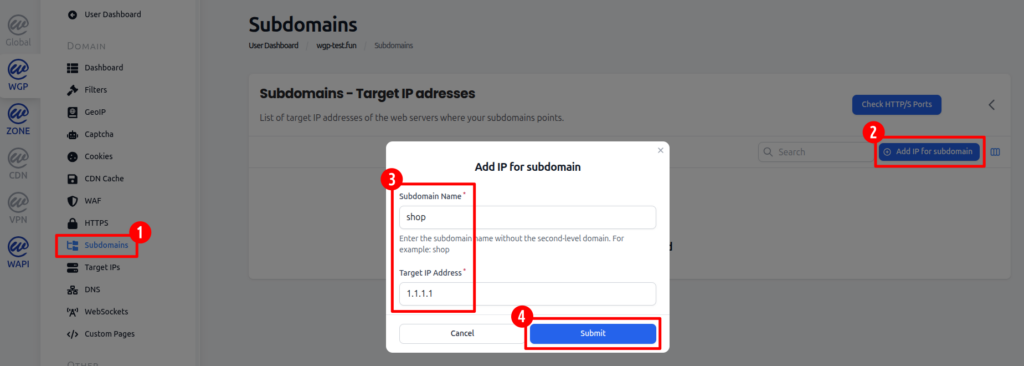
Once saved, the subdomain will use the same protection settings as the main domain but will direct to the new IP address.
Advanced Options: Load Balancing and Backup
When adding multiple target IP addresses for a single subdomain, you can optionally configure:
- Weight. Higher number gives the server higher priority in traffic distribution.
- Backup. Marks the server as a backup – used only if primary servers are unavailable.
These options allow you to load balance traffic across multiple servers or set up failover for increased reliability.