
HTTPS and Certificates
HTTPS is a fundamental requirement for modern websites, protecting data transmitted between visitors and the server through encryption. WEDOS.protection provides built-in HTTPS support, allowing secure traffic handling at the proxy level while maintaining high performance and strong security controls.
WEDOS.protection supports automatic certificate management using Let’s Encrypt, as well as the option for custom SSL/TLS certificates when necessary. HTTPS Pass Thru allows encrypted traffic to pass through our proxy servers when necessary for data compliance. HSTS enforces HTTPS-only connections and helps protect against downgrade attacks.
HTTPS in WEDOS.protection
With mandatory HTTPS support, WEDOS Global Protection acts as a secure reverse proxy. The encrypted (TLS) connection from the visitor is terminated at WGP, where the request is temporarily decrypted so it can be inspected for attacks. After all security checks are applied, the request is encrypted again and securely forwarded to the origin server.
By default, WEDOS.protection provides HTTPS using Let’s Encrypt certificates, allowing most websites to be secured without manual certificate management.
To manage HTTPS settings in the WGP dashboard, select a domain and then navigate to HTTPS under the Domain details. Here you can:
- Enable HTTPS Pass Thru.
- Enable HSTS.
- Upload and manage your own custom SSL/TLS certificate with an Expert or higher subscription.
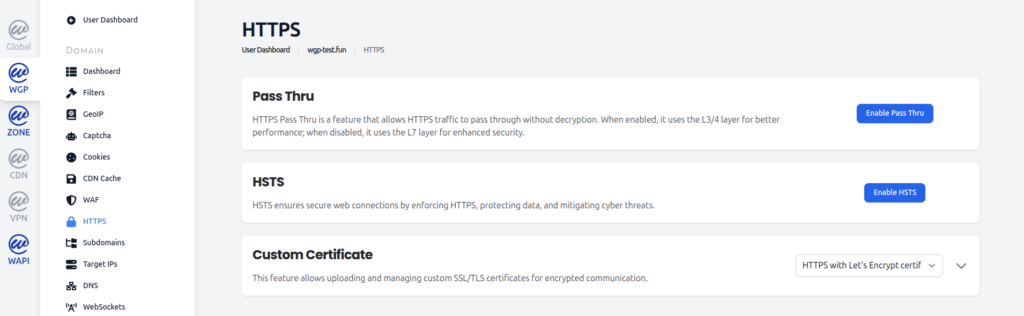
HTTPS Pass Thru
HTTPS Pass Thru is a mode that allows encrypted traffic to pass through the proxy without decryption.
When Pass Thru is enabled:
- Traffic is processed on the L3/L4 network layer.
- HTTPS content on L7 is not inspected.
- Performance is optimized due to reduced processing.
- Data remains encrypted allowing for data compliance.
When Pass Thru is disabled (default):
- Traffic is processed on the L7 application layer.
- Requests can be inspected by WAF, filters, and other security mechanisms.
- Security, visibility, and control are increased.
Pass Thru is useful in scenarios where encryption must remain end-to-end, but it limits the availability of advanced application-level protections. In this scenario it is recommended to set up your own Firewall or security solution on the server.
HSTS (HTTP Strict Transport Security)
HSTS is a security mechanism that enforces the use of HTTPS for all connections to the website.
When HSTS is enabled:
- Browsers are instructed to use HTTPS only.
- Downgrade attacks are prevented.
- Accidental access over unsecured HTTP is blocked.
This helps protect users from man-in-the-middle attacks and ensures consistent encrypted communication.
Because HSTS affects browser behavior, it should be enabled only when HTTPS is fully configured and working correctly.
Custom Certificate
WEDOS.protection supports both automatically managed certificates (Let’s Encrypt) and custom SSL/TLS certificates.
HTTPS with Let’s Encrypt
By default, WEDOS.protection can automatically issue and renew certificates using Let’s Encrypt. This option:
- Requires no manual certificate management.
- Provides trusted, widely accepted certificates.
- Automatically renews certificates before expiration.
This is the recommended option for most users.
Custom Certificates
For Expert and higher users, you can upload and manage your own SSL/TLS certificates.
Custom certificates are commonly used when:
- Organization-issued certificates are required.
- Extended validation or specific certificate authorities are needed.
- Existing certificate infrastructure must be reused.
Once uploaded, the certificate is used by WEDOS.protection to secure HTTPS traffic for the selected domain.
Choosing the Right HTTPS Configuration
In most cases, using HTTPS with automatic certificate management and application-layer inspection provides the best balance between security and usability.
Advanced configurations, such as HTTPS Pass Thru or custom certificates, are useful for specialized environments but may limit certain protection features.