
Filters
Filters are one of the primary security mechanisms used by WEDOS.protection proxy servers to block malicious and unwanted traffic before it reaches your web server. They allow WEDOS.protection to stop threats based on where traffic comes from, how it is identified, or which part of the website is targeted.
By combining automated AI-driven protection with optional custom rules, filters give you both strong default security and fine-tuned control when needed.
How Filters Work
WEDOS.protection filters operate on the proxy level. This means that traffic is analyzed and filtered before it reaches your origin server, reducing load and preventing malicious requests from ever touching your infrastructure.

Filters are enabled in AI Mode by default. In this mode, the system automatically evaluates traffic patterns and blocks requests that are identified as threats. WEDOS.protection uses years of historical data and continuously adapts to the evolving global cybersecurity landscape.
AI Mode is always active and cannot be disabled. Start and Advanced plans use AI Mode only, while users with an Expert subscription plan or higher can add custom filter rules on top of AI protection for additional control.
Accessing Filters in the Dashboard
To manage filters in the WGP dashboard, select a domain and then navigate to Filters under the Domain details.
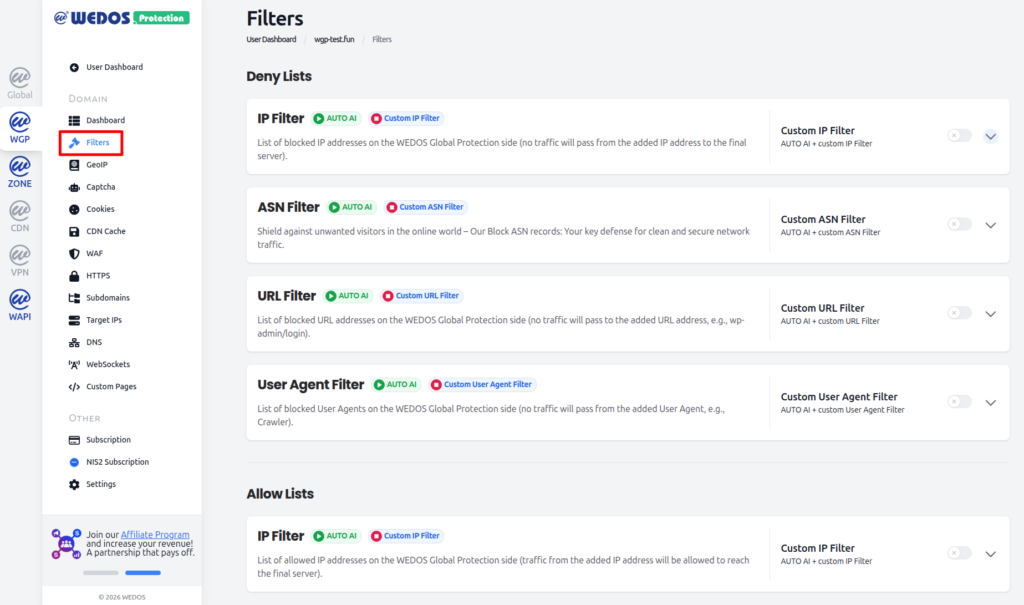
The dashboard is divided into two main sections:
- Deny Lists used to block traffic.
- Allow Lists used to explicitly allow trusted traffic.
Types of Filters in WEDOS.protection
WEDOS.protection currently supports five types of filters, each designed to address different categories of traffic.
IP Filter (Deny)
The IP Filter blocks traffic coming from specific IP addresses or IP ranges.
This filter is especially useful when:
- An attack originates from a single IP address.
- A small subnet is generating unwanted traffic.
- You want to immediately block a known malicious source.
ASN Filter
The ASN Filter blocks traffic based on Autonomous System Numbers (ASNs). An Autonomous System represents a group of IP networks operated by an organization such as an ISP, hosting provider, or cloud service. Blocking an ASN allows you to stop traffic from an entire network rather than individual IP addresses.
This filter is effective when:
- Attacks originate from large hosting providers.
- Malicious traffic rotates across many IPs within the same network.
URL Filter
The URL Filter protects specific URLs or paths on the domain.
Unlike IP or ASN filters, which block traffic sources, the URL Filter blocks access to selected addresses on the website. This is commonly used to protect sensitive endpoints such as login pages or administrative paths.
For example, you can block traffic to:
/wp-admin//login- Other application-specific URLs.
User Agent Filter
A User Agent identifies the type of client making a request, such as a browser, crawler, or automated tool. This information is sent in the User-Agent HTTP header.
The User Agent Filter blocks requests that match specific user agent strings. This can help stop:
- Known malicious crawlers.
- Web scrapers.
- Bots using identifiable or suspicious user agents.
IP Filter (Allow)
The IP Filter allows traffic coming from specific IP addresses or IP ranges.
This filter is especially useful when:
- You want to allow access to an IP address that would normally be blocked.
- You want to give access to a login page (for example
/wp-login) to a few select users – in combination with the URL Filter blocking the same path. - Your internal system should only be accessible from within your system (IP range) – in combination with URL Filter.
This filter is only available with an Expert subscription or higher.
Custom Filters
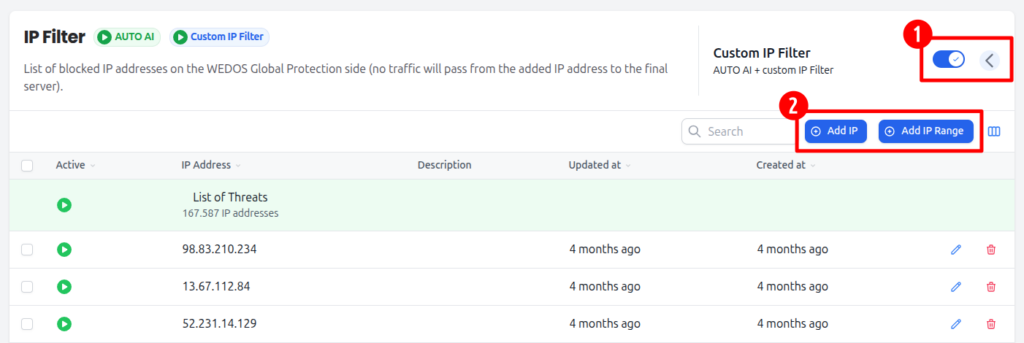
Enable custom filters by clicking the toggle switch next to the specific filter, then adding the data you want to filter in the dropdown section.
What Happens When Traffic Is Blocked
When a request is blocked by a filter:
- Browser requests see an Access Denied error page.
- Non-browser requests receive an HTTP 456 response code.
These responses clearly indicate that traffic was stopped by WEDOS.protection before reaching the origin server.